Coming 2026

Pin anything to any drawing,
location or person.*
Know exactly where it is.

SitePin turns construction sites into living workspaces. Pin data, photos and notes to drawings, locations or people — then track everything in real-time with sub-5cm VPS accuracy. No beacons required.

See how it works
  • Sub-5cm accuracy
  • Works offline
  • No hardware needed
  • Evacuation-ready

*Person tracking requires the SitePin app running on the individual’s phone with location permissions enabled.
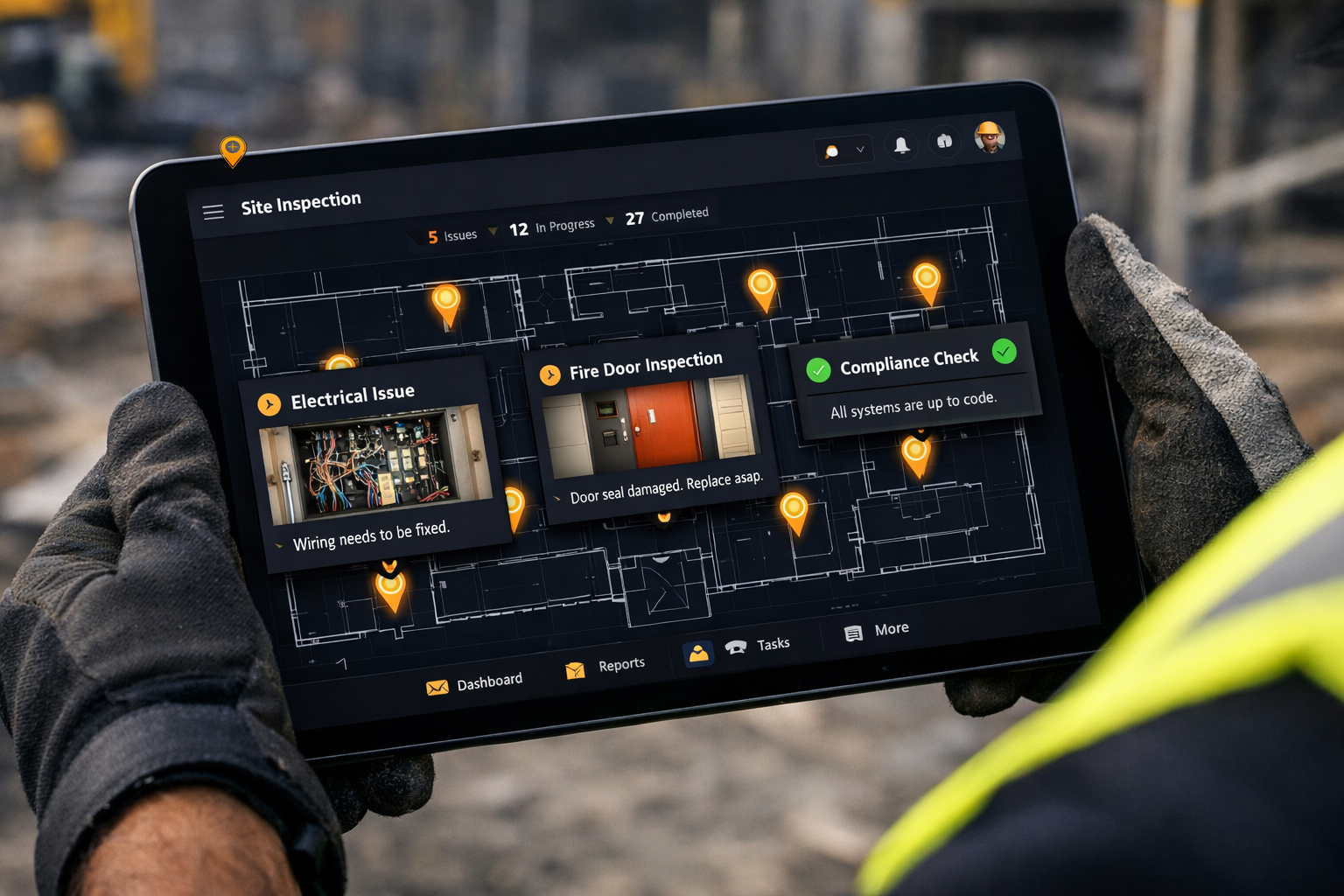
SitePin site inspection — pinned data on a floor plan with inspection cards Site Inspection
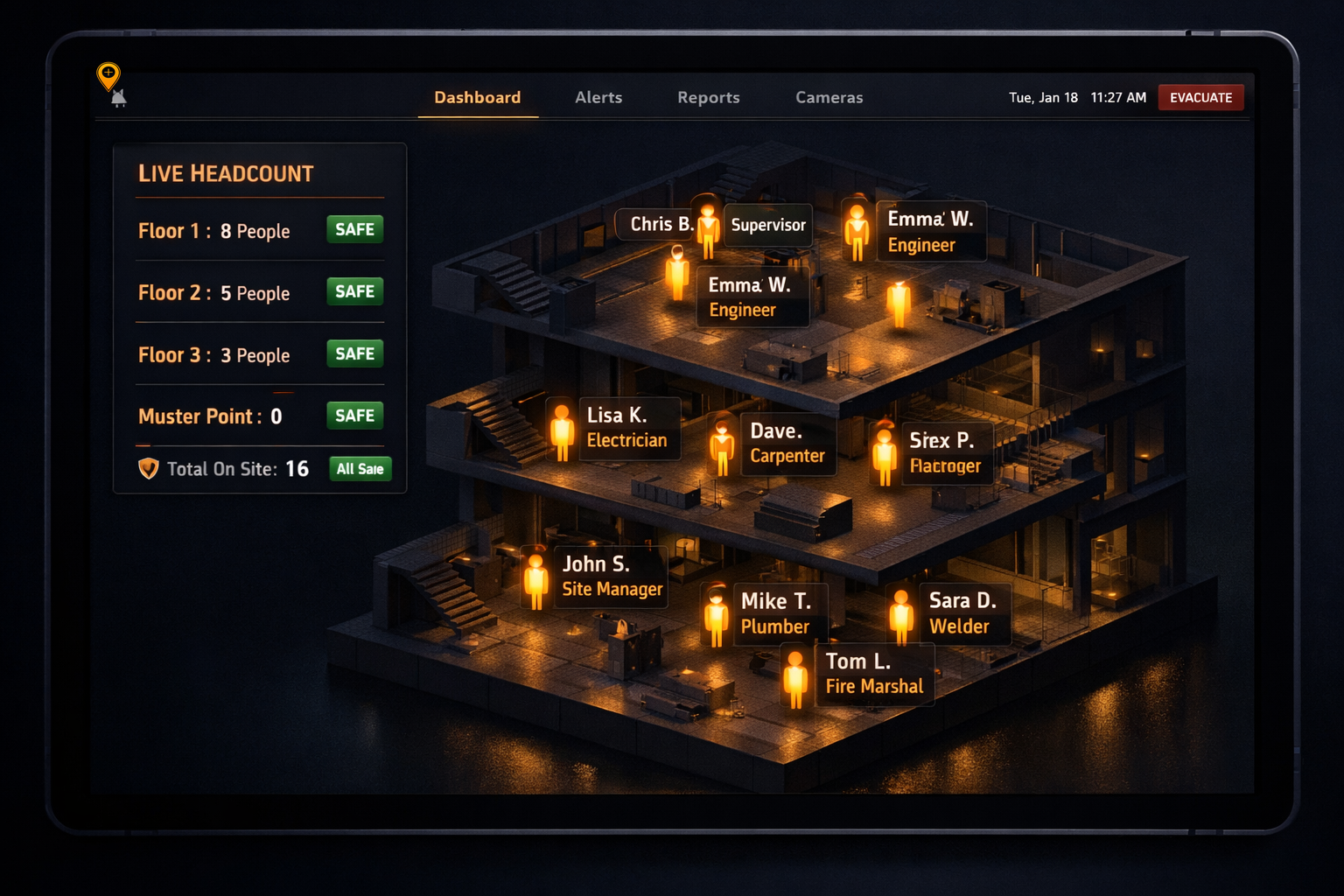
SitePin person tracking — live headcount across building floors with evacuation status Live Person Tracking
Sub-5cm
Indoor accuracy

Camera-based VPS positioning, no beacons required.

All trades
Universal compatibility

Electrical, mechanical, fire safety, structural — any drawing, any trade.

52ms
Positioning latency

Real-time tracking with zero perceptible lag.

6-DoF
Degrees of freedom

Full position and orientation from phone camera.

The problem

The data exists.
The spatial anchor doesn't.

Construction teams drown in photos, reports and inspection data — but almost none of it is anchored to a location on the drawing. That's where intelligence leaks out.

The disconnected fire door inspection

200 doors. Paper forms. Photos with no location context. The compliance report takes three days to assemble.

The orphaned site photo

40 photos in the WhatsApp group. Nobody knows which is where. The PM spends an hour matching them to rooms.

The unresolvable defect log

80 rows in Excel. No drawing reference. Six weeks later a re-survey is the only way to locate defect #42.

No lightweight annotation tool

Bluebeam costs £320+/year per seat. Overkill when all you need to do is mark up a drawing and share it.

AI extraction loses spatial context

Extraction outputs a flat table of items. No drawing link. No way to audit "where was this on the plan?".

The paper sign-in book

A scruffy clipboard at the gate. Illegible names, guessed times, a disclaimer nobody reads. Until something goes wrong and nobody can prove who was told what.

The evacuation nobody trusts

Fire alarm sounds. The site manager grabs a clipboard and starts shouting names. Nobody knows who's on which floor, who's left, or who never signed in. Precious minutes wasted.

How it works

Three steps. One source of spatial truth.

  1. 01

    Upload any drawing

    PDF, image, multi-page plans. Your existing drawings work immediately — no conversion, no re-drafting, no specialist software.

  2. 02

    Drop pins, attach data

    Click anywhere. Add title, category, severity, photos, notes. Colour-coded by type — defects red, hazards orange, notes blue.

  3. 03

    Export or track live

    Annotated PDF, CSV export, or real-time VPS positioning on the drawing. Your audit trail is spatial, not just tabular.

Features

Everything you need
on one drawing.

A focused toolkit for field teams, surveyors, and operations managers. No bloat, no 40-tab settings menu.

Structured pin data

Title, category, severity, status, room/zone, notes — every pin is a first-class record.

5 pin categories

Defect, Hazard, Note, Item, Query — each with its own colour so the drawing reads at a glance.

Photo attachments

Camera upload from mobile, thumbnails in the detail view, full-screen lightbox on tap.

Filterable pin list

Filter by category, severity, status. Click a row to pan the drawing straight to the pin.

PDF + CSV export

Annotated drawing with a summary table — or raw structured data for your own systems.

Mobile-responsive

Pinch to zoom, touch to place, works in the field with gloves on. Built mobile-first.

VPS indoor positioning

Camera-based sub-5cm tracking. No beacons, no Wi-Fi, no hardware. Multi-floor stitching built in.

API + webhooks

Full CRUD, bulk create, real-time events for automations and integrations with your stack.

Digital site log

Replace the paper sign-in book. Workers check in on their phone with a legal disclaimer tick box — timestamped, location-verified, audit-ready.

Digital site log

Kill the paper
sign-in book.

Every construction site has one. A clipboard at the gate with a scruffy sheet of paper. Names are illegible, times are guessed, and nobody reads the disclaimer. Until something goes wrong.

SitePin replaces it with a digital site log on every worker's phone.

  • Legal disclaimer with tick box "I understand the risks associated with this construction site and confirm I have received the site safety briefing." Timestamped, logged, legally defensible.
  • Automatic sign-in / sign-out VPS detects when a worker enters or leaves the site. No manual check-in required.
  • Real-time headcount Site manager sees exactly who is on site right now. Instant muster check in an emergency.
  • Exportable audit trail Every sign-in, disclaimer acknowledgement, and time on site — exportable as PDF or CSV for HSE compliance.
  • Customisable disclaimer text Add site-specific risks, PPE requirements, or induction confirmations. Update any time — workers see the latest version on next sign-in.
Evacuation & site safety

Know who's on site.
Every second counts.

When the alarm sounds, you need a headcount in seconds — not minutes. SitePin gives site managers a live view of every person on site, where they are, and whether they've reached the muster point.

*All person tracking and location features require the SitePin app to be running on the individual’s phone.

Live headcount

Real-time count of everyone on site. One tap shows who's signed in, when they arrived, and which zone they're in.

Emergency muster check

Trigger an evacuation roll call. Workers confirm "safe" on their phone. The dashboard shows who's accounted for and who isn't — floor by floor.

Floor-by-floor tracking

VPS knows which floor every worker is on. During evacuation, see a per-floor breakdown — no guesswork, no missed floors.

Hazard zone alerts

Pin hazard zones on the drawing. When a worker enters one, their phone alerts them. Site managers see who's in restricted areas at any time.

HSE compliance export

Every sign-in, disclaimer acknowledgement, muster check and zone entry — exportable as PDF or CSV for your HSE file, CDM records, or insurance audit.

Visitor & contractor tracking

Visitors, subcontractors, delivery drivers — everyone signs in through SitePin. Know exactly who's on your site at any moment, not just your own team.

Use cases

Built for everyone
who works from drawings.

For ABBE-qualified Fire Door Assessors

Every door pinned. Every inspection defensible.

Post-Grenfell regulations demand evidence. SitePin gives each fire door a spatial anchor on the plan — with photos, inspection status and severity attached. The annotated PDF becomes your compliance record.

  • 2–3 hours saved per building
  • Every door traceable to a drawing location
  • Annotated PDF exports audit-ready
LEVEL 02 · FIRE DOOR SCHEDULE
For M&E Contractors

Tender drawings linked to site observations.

Mark clashes, missing services, and condition issues directly on the consultant's drawings. Pin data syncs to your job file — no more "where exactly did you see this?" back and forth.

  • Pin clashes on the drawing, not in email
  • Bulk-import from existing surveys
  • Photo evidence for every variation claim
For RICS-regulated Building Surveyors

RICS-aligned defect schedules with spatial context.

Condition surveys, schedules of dilapidation, homebuyer reports — every defect anchored to the plan, with photos and severity attached. Export as annotated PDF for the client and CSV for your system.

  • RICS severity scale built in
  • Spatial audit trail for every finding
  • Client-ready branded exports
For Insurance Assessors

Spatially referenced damage reports.

Fire, flood, subsidence — pin every instance of damage to the plan with photographs and severity ratings. Claim adjustors get a drawing they can read, not a spreadsheet they have to interpret.

  • Photographic evidence per location
  • Spatial chain of custody
  • Faster claim settlement
For H&S Auditors

Hazard pins with severity escalation.

Trip hazards, missing PPE zones, exposed wiring — log with a tap, set severity, assign to responsible party. VPS entry alerts warn workers when they enter a high-risk zone.

  • Auto-assigned severity workflows
  • Entry alerts for hazard zones
  • Incident heatmaps from pin data
For Facilities Managers

Spatial asset registers on floor plans.

AHUs, fire extinguishers, meters, signage, access points — every asset pinned to the plan with service dates, photos and specs. Walk the site and find what you need instantly.

  • Live asset register on the drawing
  • Service dates & maintenance history
  • Nearest-asset lookup via VPS
For Site Managers & Principal Contractors

Instant muster. Every person accounted for.

When the alarm sounds, SitePin shows who's on site, which floor they're on, and whether they've reached the muster point. No clipboards, no shouting names, no guessing. CDM-compliant records generated automatically.

  • Seconds to full headcount, not minutes
  • Floor-by-floor breakdown of unaccounted workers
  • CDM & HSE audit trail exported instantly
MUSTER
Visual Positioning System

See exactly where you are.
On the drawing.

Powered by Visual Positioning System technology. Your phone camera matches what it sees to a 3D map of the building — delivering centimetre-level positioning with no beacons, no Wi-Fi, no specialist hardware.

  • Real-time position shown on drawing
  • Nearest-pin alerts (“You are 2m from pin #47”)
  • Hazard zone entry alerts
  • Auto-populate room/zone from position
  • Breadcrumb trail for inspection completeness
  • Emergency muster check — see all workers
  • Works offline with on-device processing
  • Multi-floor stitching (automatic floor detection)
Pricing

Scale from a single site
to a national operation.

Transparent UK pricing. No per-user surprise charges, no three-year enterprise lock-ins.

Starter

For independent surveyors and small teams

£19/month
  • 500 pins / month
  • PDF & CSV export
  • Photo attachments
  • Unlimited drawings
  • — No API access

Enterprise

For multi-site operators and public sector

POA
  • White-label reports
  • Custom templates
  • 99.9% SLA
  • Dedicated account manager
  • SSO & audit logs

VPS positioning available as an add-on from Phase 4 launch. Pricing will be announced closer to release.

FAQ

Questions, answered plainly.

What file types are supported?
PDF, PNG, JPG and TIFF. Multi-page PDFs are supported with automatic page indexing. Drawings render at their native resolution — zoom in to pin individual components.
Do I need special hardware?
No. For pin placement and exports, any modern browser works. For VPS positioning, any phone with a rear camera made in the last five years will do — no beacons, no Wi-Fi, no surveying equipment.
How accurate is VPS positioning?
Sub-5cm median accuracy with near-instant latency. That's accurate enough to distinguish adjacent assets in a plant room, and fast enough for continuous tracking without perceptible lag. VPS positioning is a future enhancement — core features like pin placement, site log, and evacuation work from day one without it.
Can multiple users collaborate?
Yes — Phase 3 of the rollout introduces real-time collaboration via Socket.io. Multiple surveyors can drop pins on the same drawing simultaneously, with live cursors and change streams.
Is there an API?
Yes. Full CRUD endpoints for pins, drawings and projects. Bulk create for migration from Excel. Webhooks fire on pin create, update and status change — ideal for integrating with your CDE or ticketing system.
How does it compare to Bluebeam?
Bluebeam Revu starts at roughly £320/year per seat. It's a heavyweight PDF tool with no AI and no spatial positioning. SitePin starts at £19/month, with structured pin data, AI-assisted workflows and VPS tracking.
What about Procore or Fieldwire?
Procore and Fieldwire are enterprise-priced (often £700+/month, US-built) and oriented around whole-project management. SitePin is UK-built and SME-priced — a focused spatial annotation layer that sits next to whatever PM tool you already run.
Is my data secure?
End-to-end encryption in transit and at rest. All data is held in UK data centres. GDPR compliant, with DPA available on request and SSO for Enterprise plans.
How does the evacuation muster check work?
When you trigger an evacuation, every signed-in worker gets a push notification to confirm they're safe. The dashboard updates in real time — showing who's accounted for and who isn't, broken down by floor. VPS tracking shows last known positions for unaccounted workers. The full muster record is exportable for your HSE file and CDM compliance.
Does SitePin help with CDM compliance?
Yes. SitePin generates the records principal contractors need under CDM 2015 — site induction logs, safety briefing acknowledgements, who was on site and when, hazard zone entries, and evacuation muster checks. All exportable as PDF or CSV for your health and safety file.
What devices does SitePin work on?
Any smartphone — iPhone or Android, made in the last 5–6 years. SitePin runs as a web app in your browser (Chrome, Safari, Edge, Firefox) so there’s nothing to install from an app store. Pin placement, digital site log, evacuation muster, exports, and hazard management all work on any modern browser. Camera-based VPS positioning will also work in-browser when it launches — no native app needed.
Does person tracking work in the browser?
Yes. Site log check-in/out, evacuation muster confirmation, and location-based features all work in the browser. Workers sign in, confirm the safety disclaimer, and the system tracks who’s on site. On Android, background location works well. On iPhone, the app needs to be open for live location — but sign-in/out and muster confirmations work regardless. No native app required.

Start pinning.
Start knowing.

Early access opens soon. Be first in line.